What's new?
Here you see an overview about new features and bug fixes for new versions.
Version 1.8.0
Migrate to nuke-18
Update styles
Version 1.7.0
Create empty task for job when there is no favorite task specified
When you create a new job then a default task gets created as well so you save that manual click for a new task.
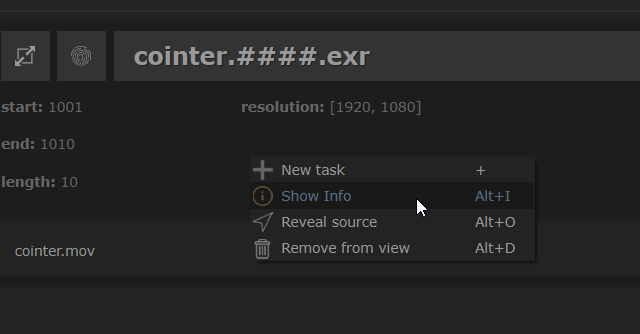
Add 'Show info' to job's context menu
Right click a job and access the info from the context menu.
Store window size on resizing main window
The window size gets now stored, even when closing smartMedia
Add notification widget
This update adds an auto closable notification widget to give quick information on various actions.
Version 1.6.2
Version 1.6.1
Fix: module 'urllib' has no attribute 'request' in standalone mode
Version 1.6.0
Update to nuke-16
Version 1.5.0
Speed up processing time when dropping sources into smartMedia
Dropping source media into smartMedia processes the source information now a lot faster, especially when dropping sequence files into smartMedia.
Make color management configurable
In the settings you can now configure the color management to run all jobs in. Choose from 'nuke', 'aces' and custom for a custom OCIO config.

Bulk configure Text fonts using env var CRAGL_CUSTOM_DEFAULT_FONT
All smartMedia nodes and presets reference Text fonts using
nuke.defaultFontPathname(). You can bulk change the font used for all
nodes by overriding this behavior. Simply set the environment variable
CRAGL_CUSTOM_DEFAULT_FONT to the preferred font path.
Other
Fix: smart_media_nuke is not defined
Version 1.4.0
Update to nuke-15
Version 1.3.0
Add studio model
Add Changelog and Support commands to Help menu

Version 1.2.0
Other
Update to nuke-14
Version 1.1.0
Ingest sources from text file
This update adds the functionality to drop a .txt file into smartMedia in order to ingest all sources stated in that .txt file. Each line should therefore represent one source. The actual frame stated per source does not matter since smartMedia will find out the actual frame range for each source on disk.
Set presets as default
Each preset can be set as a default inside the presets section. Whenever a new source gets added to smartMedia, all presets that were set as default get automatically added as new task for the new source. This reduces the need to create often needed tasks manually over and over again.
Version 1.0.0
Initial release